
Centro de ayuda
Guía de Usuario
Todo lo que necesitas saber para aprovechar al máximo Parvel y mantenerte informado sobre las actividades parlamentarias.
1. Página de Inicio y Navegación
Guía rápida de la página de inicio y explicación de todas las opciones disponibles en el menú de navegación.
¿Qué encontrarás en la página de inicio?
La página de inicio es simple y directa. Encontrarás todas las sesiones de la semana, tanto las que ya sesionaron como las próximas, además de un acceso directo a los boletines guardados e información general.
Interacción con las sesiones
Puedes hacer clic en cualquier comisión de la página de inicio para ser dirigido directamente al chat, donde encontrarás información detallada de la sesión y podrás interactuar con la transcripción completa. Más información en
"2. Chat y Transcripción"Sesiones
Sesiones de hoy
Visualiza todas las sesiones programadas para el día actual.
Sesiones de la semana
Ve todas las sesiones de la semana en curso, organizadas por fecha.
Sesiones programadas
Consulta las sesiones futuras confirmadas con sus horarios.
Todas las sesiones
Aquí puedes encontrar todas las sesiones. Se pueden aplicar filtros por tipo de sesión o fechas. Importante: el buscador busca el nombre de la sesión, no busca texto de la citación o la transcripción. Para eso está el "Buscador por palabra".
Buscar por palabras
Busca por palabra específica en las transcripciones. Más información en
"4. Búsqueda por Palabras"Alertas
Página para configurar alertas y ver historial de alertas recibidas. Más información en
"3. Sistema de Alertas Inteligentes"Boletines
Buscador de boletines de proyectos de ley. Más información en
"5. Proyectos de Ley (Boletines)"Citaciones
Lista de las próximas citaciones, con sus respectivos contextos, horarios, etc.
Chat
Chat global en fase Beta, para consultas más generales. Es distinto al chat en la transcripción que tiene como contexto exclusivamente esa transcripción específica.
Enviar feedback
Permite enviar cualquier comentario al equipo de Parvel: errores de transcripción, falta de contenido, ideas, etc. Será contestado por mail lo antes posible.
Ayuda
Dirige al Manual de uso (esta página actual).
2. Chat y Transcripción
Accede a transcripciones completas de sesiones parlamentarias y conversa con una IA que conoce todo el contenido.
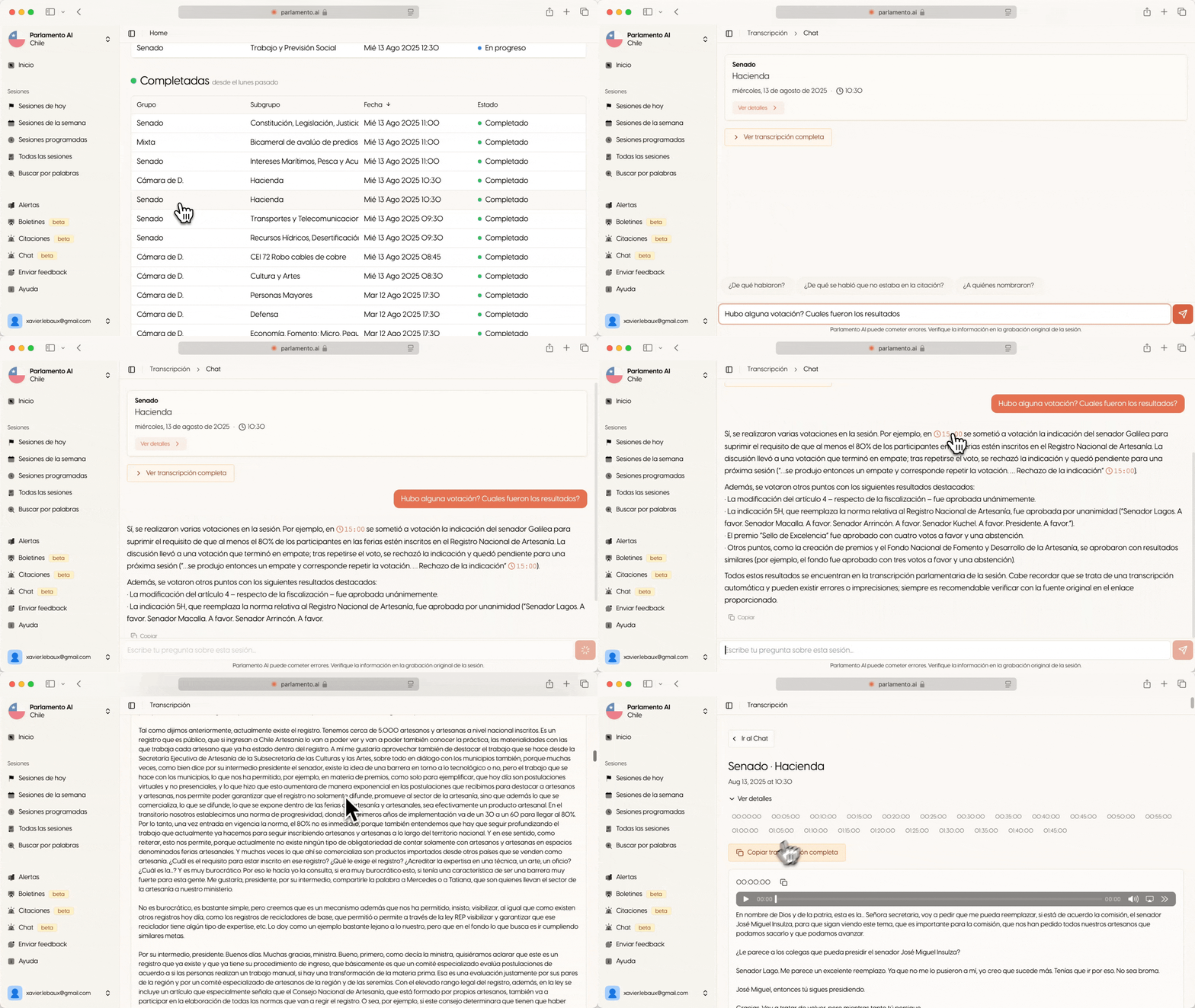
Enlaces con timestamp (marca de tiempo)
Redirige al párrafo exacto donde se discute el tema en la sesión, donde encontrarás el audio correspondiente. Esto es crucial para verificar información, ya que toda información delicada debe ser verificada con la transmisión original.
Acceso a transmisión original
Puedes solicitar al chat el enlace directo a la transmisión oficial para verificación completa de la información.
Transcripción completa
Acceso total a la transcripción donde puedes revisar, escuchar el audio sincronizado o copiar el texto completo.
Ten en cuenta
El chat tiene acceso únicamente a la transcripción de la sesión específica que estás viendo. No conoce sesiones pasadas o documentos externos.
Ejemplos de preguntas que puedes hacer:
""¿Qué se discutió sobre educación superior?""
""¿Quién habló sobre el proyecto de pensiones?""
""Resume los puntos principales de esta sesión""
""¿Hubo alguna votación? ¿Cuáles fueron los resultados?""
""Genera una nota de prensa sobre esta sesión""
""¿Cuáles fueron las posturas diferentes sobre este tema?""
3. Sistema de Alertas Inteligentes
Recibe notificaciones personalizadas por email cuando se mencionen temas de tu interés en las sesiones parlamentarias.
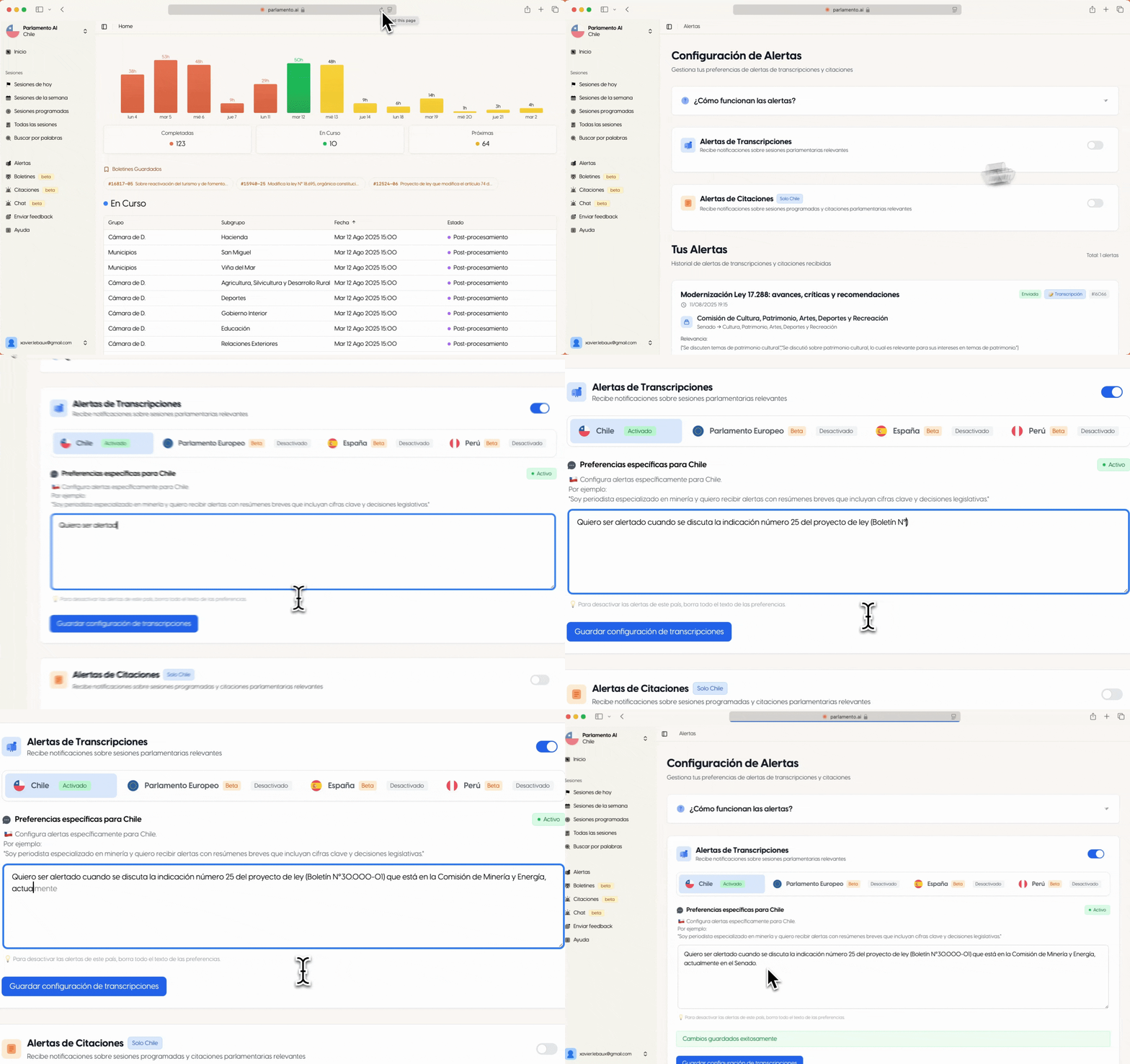
¿Cómo funcionan las alertas?
Las alertas se basan en un "prompt" personalizado que tú escribes. Cada vez que se completa una sesión parlamentaria, nuestra IA analiza la transcripción completa usando tu prompt para decidir si hay algo relevante para ti.
Lo que recibes por email:
Un resumen de por qué la sesión es relevante para ti
Citas textuales específicas de la transcripción
Contexto sobre quién habló y de qué se trataba
Cómo configurar tus alertas
- 1
1. Ve a la sección "Alertas"
Encuentra el enlace "Alertas" en el menú lateral izquierdo de la plataforma.
- 2
2. Activa las alertas
Usa el botón de toggle para activar el sistema de alertas para tu cuenta.
- 3
3. Escribe tu prompt personalizado
En el campo de texto, describe exactamente qué temas te interesan. ¡Este es el paso más importante!
- 4
4. Guarda los cambios
Haz clic en "Guardar" y las alertas comenzarán a funcionar con las próximas sesiones.
La clave del éxito: SÉ ESPECÍFICO
La diferencia entre recibir alertas útiles y spam está en lo específico que seas. Evita términos muy generales que aparecen en muchas sesiones.
Términos muy generales a evitar:
- × "agua" → Aparece en muchos contextos
- × "tecnología" → Demasiado amplio
- × "educación" → Muy frecuente
- × "salud" → Se menciona constantemente
Sé más específico:
- ✓ "ley del vaso de agua" → Muy específico
- ✓ "inteligencia artificial en educación"
- ✓ "educación superior universidades"
- ✓ "reforma al sistema de pensiones"
Ejemplos de prompts exitosos
Para un lobista de minería:
"Quiero ser alertado sobre regulaciones de minería, especialmente sobre el tratamiento de residuos tóxicos, permisos ambientales para proyectos mineros, y cualquier discusión sobre el código de aguas en relación a la minería. También sobre proyectos de ley que mencionen específicamente el cobre, litio, o explotación minera en general."
Específico, con contexto claro y términos técnicos relevantes
Para un periodista de educación:
"Alertar sobre discusiones de educación superior, especialmente financiamiento universitario, reforma al CAE (Crédito con Aval del Estado), cualquier mención del Ministerio de Educación en presupuestos, y debates sobre acceso a universidades. También sobre el diputado María González cuando hable de temas educativos."
Menciona temas específicos, acrónimos relevantes y una persona de interés
Para seguir un proyecto específico:
"Notificarme sobre el boletín 12524-06 que modifica el Código del Trabajo, cualquier mención de reforma laboral, discusiones sobre jornada de trabajo de 40 horas, y cuando se hable del Ministro del Trabajo. También sobre votaciones relacionadas con derechos laborales."
Incluye número de boletín específico y términos técnicos del área
Para temas de salud específicos:
"Interés en discusiones sobre diabetes, especialmente ley de etiquetado de alimentos, regulación de productos ultraprocesados, y presupuesto para programas de prevención de diabetes tipo 2. También sobre la diputada Ana Silva cuando participe en la Comisión de Salud."
Tema de salud específico con contexto legislativo y persona relevante
Qué incluir en tu prompt para mejores resultados
Temas específicos
En lugar de "salud", especifica:
- "reforma al sistema de pensiones"
- "ley de etiquetado nutricional"
- "regulación de medicamentos genéricos"
Comisiones específicas
Menciona las comisiones que te interesan:
- "Comisión de Hacienda"
- "Comisión de Salud"
- "Comisión de Medio Ambiente"
Números de boletín
Si sigues leyes específicas:
- "boletín 12524-06"
- "proyecto de ley 11.111-07"
- "ley 21.040"
Personas específicas
Diputados, senadores o ministros:
- "diputada María González"
- "senador Juan Pérez"
- "Ministro de Educación"
Organizaciones
Entidades mencionadas frecuentemente:
- "SERNAC"
- "SII" (Servicio de Impuestos Internos)
- "Banco Central"
Términos legales
Lenguaje parlamentario específico:
- "segunda tramitación"
- "votación en particular"
- "urgencia simple"
Consejos avanzados para expertos
Combina términos técnicos y coloquiales
"CAE, crédito universitario, financiamiento estudiantil" captura más variaciones del mismo tema.
Especifica el tipo de contenido
"Votaciones sobre..." o "Intervenciones del Ministro sobre..." o "Urgencias relacionadas con...".
Actualiza tu prompt regularmente
Conforme cambien tus intereses o surjan nuevos temas, actualiza tu prompt para mantener relevancia.
¿No recibes las alertas que esperas?
Si recibes demasiadas alertas: Tu prompt es muy general. Hazlo más específico.
Si no recibes suficientes alertas: Tu prompt puede ser demasiado específico. Amplía un poco los términos.
Si no recibes ninguna alerta: Verifica que las alertas estén activadas y que tu prompt use términos que realmente aparecen en las sesiones. Si lo prefieres, contacta al equipo de Parvel y te ayudamos a configurar tus alertas.
4. Búsqueda por Palabras
Encuentra cualquier mención específica en todo el archivo parlamentario o dentro de una sesión particular.
Cómo hacer búsquedas efectivas:
1. Palabras sueltas
Escribe palabras separadas por espacios. El sistema buscará sesiones que contengan todas esas palabras.
educación superior universidades → Encuentra sesiones que mencionen las tres palabras
2. Frases exactas
Usa comillas para buscar una frase exacta. Útil para nombres oficiales, títulos de leyes, etc.
"proyecto de ley de pensiones" → Encuentra esa frase exacta
3. Combinaciones
Puedes combinar palabras sueltas con frases exactas para búsquedas más precisas.
"comisión de salud" covid vacunas → Menciones de covid y vacunas en la comisión de salud
Ejemplos de búsquedas exitosas:
"ley del agua" sequíaVe todas las discusiones sobre agua y sequía
votación "en general" aprobadoEncuentra votaciones aprobadas en general
"ministro de educación" presupuestoQué dice el ministro sobre presupuesto
"boletín 12524" segunda tramitaciónEstado de un proyecto de ley específico
inflación "banco central" política monetariaDiscusiones económicas importantes
"reforma tributaria" impuestos empresasTodo sobre reforma de impuestos
Tips para mejores resultados:
Usa términos específicos en lugar de palabras muy generales
Las comillas son tu amigo para nombres oficiales y frases exactas
Si no encuentras resultados, prueba con sinónimos o términos más amplios
5. Proyectos de Ley (Boletines)
Sigue el progreso completo de cualquier proyecto de ley chileno con información actualizada directamente desde las fuentes oficiales.
Cómo buscar un boletín
- 1
1. Encuentra el número de boletín
Los números de boletín tienen este formato: números-números (ej: 12524-06).
- 2
2. Ve a la sección "Boletines"
En el menú lateral, encuentra "Boletines" (tiene una etiqueta "beta" naranjo).
- 3
3. Ingresa el número
En el campo de búsqueda, puedes escribir:
12524-06(solo el número)
Boletín 12524-06(con la palabra "boletín")
- 4
4. Revisa la información completa
Verás toda la información disponible sobre ese proyecto de ley, actualizada directamente desde el Senado.
Boletines guardados
Puedes guardar un boletín para encontrarlo más fácil. Aparecerá en "Boletines Guardados", donde podrás hacer click en "Cargar datos desde senado.cl" para ver rápidamente la última modificación e información del boletín.
Estados del proyecto
Los proyectos pueden estar en diferentes etapas:
Primer trámite constitucional:
Primera revisión
Segundo trámite constitucional:
Revisión en la otra cámara
Tercer trámite constitucional:
Revisión final si hay discrepancias
Promulgado:
Ya es ley
Fechas importantes
Presta atención a:
- Fecha de ingreso al Congreso
- Fechas de votaciones importantes
- Plazos para observaciones
- Fecha de promulgación (si aplica)
Documentos disponibles
Encontrarás enlaces a:
- Texto original del proyecto
- Informes de comisiones
- Modificaciones propuestas
- Texto final aprobado
Enlaces oficiales
Todos los links te llevan directamente a las páginas oficiales del Senado para verificar la información.
Disponible solo para Chile
Esta funcionalidad utiliza las APIs oficiales del Senado chileno para obtener información en tiempo real. La información se actualiza automáticamente desde las fuentes oficiales.
Estamos trabajando para expandir esta funcionalidad a otros países próximamente.
Tip: Combina con alertas
Si sigues un proyecto específico, puedes incluir su número de boletín en tu prompt de alertas para recibir notificaciones cuando se mencione en las sesiones parlamentarias.
Siguiente paso
¿Listo para aprovechar al máximo Parvel?
Ahora que conoces todas las funcionalidades, es hora de ponerlas en práctica
¿Tienes preguntas? Envíanos tus comentarios desde la sección "Enviar feedback" en la plataforma